
How to Reduce Office Printing Costs Without Sacrificing Quality

Office printing is a necessary part of daily operations—but it can also be one of the most overlooked areas for cost savings. The good news? You can reduce printing expenses significantly without compromising on quality .
Whether you're a startup, SME, or enterprise, here’s how to cut down your printing costs smartly and sustainably —with Copian by your side.
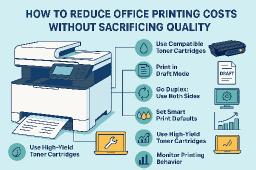
1. Use Compatible Toner Cartridges
One of the biggest savings opportunities lies in the toner you choose . Original Equipment Manufacturer (OEM) cartridges are expensive, and while they offer good quality, compatible toner cartridges from Copian deliver the same sharp results at a fraction of the price .
Benefits:
- High page yield
- Affordable cost per cartridge
- Crisp, clean prints for text and images
2. Print in Draft Mode for Internal Use
Not every document needs to be printed in high resolution. Use draft or economy mode for internal memos or drafts to save toner without affecting legibility.
3. Go Duplex: Use Both Sides
Enable duplex (double-sided) printing to cut paper usage by nearly 50%. Modern laser printers offer this as a default feature. It also reduces storage needs for physical documents.
4. Set Smart Print Defaults
Configure office computers to default to:
- Black & white printing
- Draft quality
- Double-sided mode
It reduces accidental high-cost prints and ensures cost-efficient output every time.
5. Use High-Yield Toner Cartridges
A high-yield toner may cost more upfront but offers significantly more prints per cartridge , lowering your cost per page . Copian’s toners offer 1,600+ crisp, consistent pages , perfect for high-volume offices.
6. Monitor Printing Behavior
Track print volumes across departments to identify wasteful habits . Copian recommends using basic print management software or built-in tracking from your printer to optimize usage.
7. Maintain Your Printers
Regular maintenance reduces misprints, jams, and reprints . Clean your printers, update firmware, and use quality toner to extend printer life and ensure consistent output.
Conclusion: Save Smarter with Copian
Reducing printing costs isn’t about cutting corners—it’s about printing smarter. With Copian’s high-quality compatible toner cartridges , you can maintain professional standards while slashing your monthly expenses.
Ready to optimize your printing? Visit www.copian.in to shop reliable, budget-friendly toner cartridges for all major printer brands.
Useful :
- FlexSocialBox: Everything You Need to Know About Laser Printer Cartridges
- FlexSocialBox: Environmental & Business Benefits of Eco-Friendly Toner Cartridges
- Times Square Reporter: Why Copian Toners Are Ideal for High-Volume Printing
- Elovebook Blog: Copian Toner Cartridge Insights
- Retail & Wholesale Buyer: Copian Printer Solutions
- Redebuck: Print Perfection with Copain
- Rhabits.io Blog: Premium Toner Performance
- PalzParc: Best Toner Cartridges for Office Printing
- Talkitter Blog: Copian Printer Supplies
- ConnectGalaxy: Every Part Matters – Copain Printer Components
- ConnectGalaxy: Copain – Your One-Stop Print Supply Partner
Tags